
In the fast-evolving landscape of digital marketing, a quiet revolution is taking place. For years, the standard playbook for running paid media ads has been predictable: capture attention with a compelling creative, convince the user to click, send them to an external landing page, and pray that your website layout, loading speed, and checkout process don’t scare them away.
But it’s time for a reality check. Website conversion rates across industries hover around a meager 2% to 5%. The remaining 95%+ of traffic disappears into the digital abyss, taking your precious ad budget with it. Between aggressive privacy updates, fluctuating tracking pixels, and ever-shortening consumer attention spans, forcing a user to leave their favorite social app to visit a slow website is a massive point of friction.
Enter the era of zero-friction commerce.
Instead of moving users out of their comfort zone, forward-thinking performance marketers are meeting them exactly where they are. By leveraging Meta messaging campaigns across WhatsApp, Instagram DMs, and Messenger, brands are cutting out the middleman (the traditional landing page) and replacing it with instant, conversational experiences.
Whether you are looking to maximize your Return on Ad Spend (ROAS), generate higher-quality leads, or future-proof your paid media strategy, this guide will show you how to master conversational advertising from scratch.
What are Meta Messaging Campaigns?
Before diving into tactical execution, let’s define what we are working with. A Meta messaging campaign is a specific objective within Meta Ads Manager that directs users who click your ad into a private conversation rather than a traditional landing page or web storefront.
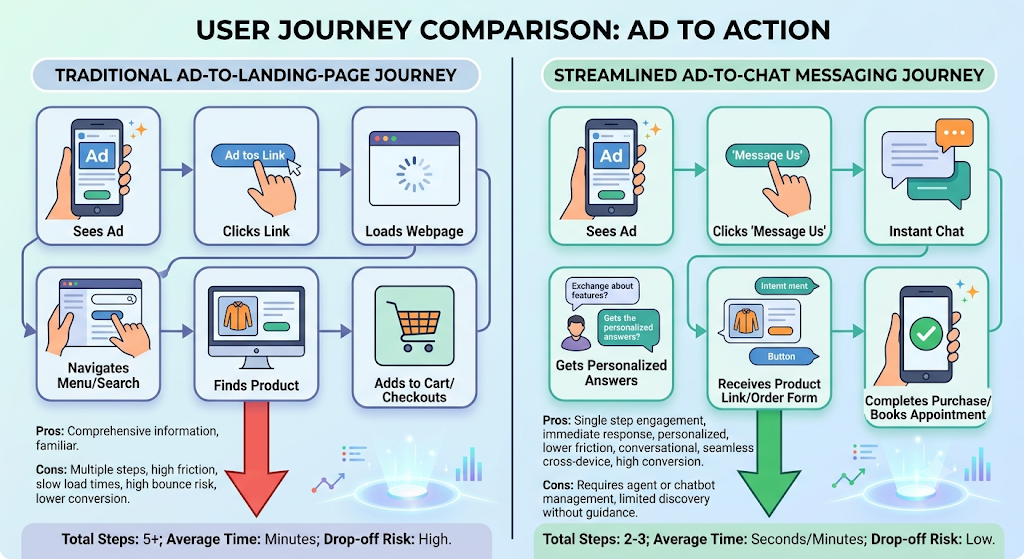
[ Traditional Path ]  Ad Click ➔ External Landing Page ➔ Form/Cart ➔ Conversion
[ Frictionless Path ] Ad Click ➔ Instant Messaging Chat (WhatsApp/IG/Messenger) ➔ Conversion
These ads utilize the “Click to Message” (CTM) format. When a user clicks your creative on their Instagram or Facebook feed, it instantly opens a chat window pre-populated with a custom greeting or automated icebreakers. From there, your brand can interact with the user via automated chatbots, manual live chat support, or a hybrid of both to close the deal.
Why Paid Media is Shifting to Conversational Commerce
To understand why this shift is happening so rapidly, we have to look at the numbers. Consumers are increasingly protective of their data, but they are incredibly open to convenient communication.
Overcoming the Landing Page Leak
Every step a user takes between seeing an ad and completing a purchase is a point where you can lose them. If your website takes 3 seconds to load, you lose traffic. If your checkout form asks for too many fields, you lose traffic. Meta messaging campaigns keep the entire journey within a native ecosystem. There is zero loading time, zero external redirects, and zero friction.
The Power of Immediate Engagement
In traditional lead generation, a user fills out a form, and a sales rep calls them back an hour later. By then, the lead is already cold. Messaging campaigns allow for real-time engagement. Whether a consumer has a quick question about sizing, pricing, or product availability, answering them instantly builds immediate trust and moves them down the funnel instantly.
Navigating the Post-Cookie Era
As first-party data becomes the gold standard of digital marketing, messaging channels act as an owned-asset goldmine. Once a user initiates a chat with your brand on WhatsApp or Instagram, you establish a direct line of communication that isn’t entirely reliant on browser cookies or tracking pixels. To dive deeper into securing data ownership, you can read our comprehensive internal guide on Alternative SEO and Search Optimization.
How to Set Up Your First Meta Messaging Campaign
Setting up a conversational campaign requires a slightly different approach than a standard traffic or conversion campaign. Follow this step-by-step framework to get started.
Step 1: Choose the Right Campaign Objective
Open your Meta Ads Manager and click Create. While you can drive traffic to messages using various objectives, selecting the Leads or Sales objective (depending on your ultimate goal) paired with the “Messaging Apps” conversion location yield the highest-quality intent. Avoid using the “Traffic” objective, as the algorithm will prioritize cheap clicks over users likely to chat.
Step 2: Configure Your Messaging Channels
At the Ad Set level, select the specific destinations where you want to receive messages. Meta allows you to select:
- WhatsApp Business (Highly recommended for high-ticket services and e-commerce markets like EMEA, LATAM, and India)
- Instagram Direct (Best for lifestyle brands, beauty, fashion, and younger demographics)
- Messenger (Excellent for local businesses, real estate, and older demographics)
For optimal performance, it is highly recommended to select all three channels initially, allowing Meta’s machine learning algorithm to deliver your ad to the platform where your target user is most active. For complete platform instructions and technical integration prerequisites, consult the official Meta Business Help Center.
Step 3: Set Budget and Targeting
Because Meta’s system needs data to optimize, start with a daily budget that allows for at least 50 conversions per week. For targeting, lean on broad or lookalike audiences. Meta’s Advantage+ system is incredibly smart; let the creative and your initial chat setup do the filtering for you.
Designing Winning Ad Creatives for Chat Destinations
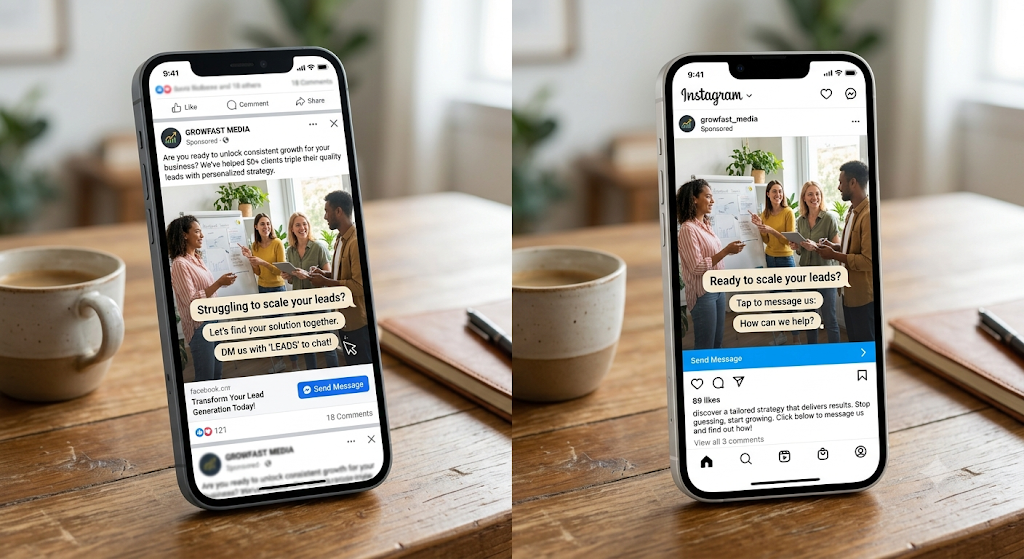
A common mistake performance marketers make is using the exact same ad creatives for landing page campaigns and messaging campaigns. If your ad says “Shop Now on Our Website,” but opens an Instagram DM, the user will be confused and close the app. Your creative must explicitly prepare the user for a conversation.
Focus on a Specific Question or Hook
Your ad copy and visual hooks should invite dialogue. Instead of a generic product showcase, address a common customer pain point and offer a personalized solution via chat.
- Weak Copy: “Buy our new skincare routine today. Click link to shop.”
- Strong Copy: “Not sure which skincare routine fits your skin type? Click ‘Send Message’ to take our quick 3-question quiz in DMs and get a personalized routine instantly!”
Use Clear Call-to-Action (CTA) Buttons
Ensure your CTA button matches the actual user experience. Use buttons like “Send Message,” “Get Quote,” or “Chat on WhatsApp.” Explicitly state in your ad image overlay or primary text what will happen when they click (e.g., “Tap below to start a quick chat with our team”).
Optimizing the Conversation: Automation vs. Human Touch
Getting a user to click your ad is only half the battle. The true magic of Meta messaging campaigns happens inside the chat box. If you leave a user hanging for hours without a response, your ROAS will plummet. You need a structured strategy to manage the intake.
[ Ad Click ]
│
▼
[ Automated Welcome Message ] (Instant response, filters intent)
│
├─► Option A: FAQ / Lead Qualification Bot (Low complexity)
│
└─► Option B: Hand-off to Live Sales Agent (High intent/High ticket)
Building Smarter Welcome Templates
Meta provides built-in messaging templates that launch the second someone opens a chat. Use these to set up “Icebreakers”—clickable buttons featuring common customer questions.
- What are your pricing packages?”
- “Can I see some past case studies?”
- “How do I book a consultation?”
Leveraging Third-Party Chatbots
For scaled automation, connect your Meta assets to third-party conversational platforms like ManyChat, Chatfuel, or a custom AI agent. You can build interactive flows that qualify leads, collect emails and phone numbers, and even process payments natively inside the messaging app.
Knowing When to Bring in a Human
While automation handles the repetitive top-of-funnel questions, high-ticket lead generation and complex sales require human empathy. Set up automation triggers that flag high-intent interactions (e.g., a user asking for custom enterprise pricing) and immediately route the conversation to a live performance marketer or sales representative.
Key Performance Indicators (KPIs) to Track Success
If you evaluate a messaging campaign based on standard e-commerce metrics like Cost Per Click (CPC) or standard Add-to-Cart events, you are missing the bigger picture. To measure the true health of your paid media strategy, monitor these metrics:
| Metric Name | What It Tracks | Why It Matters |
| Messaging Conversations Started | The total number of users who clicked the ad and sent a message/clicked an icebreaker. | Measures the hook-rate and relevance of your creative. |
| Cost Per Conversation Started | Total ad spend divided by the number of messaging conversations initiated. | Your baseline efficiency metric for comparing creative performance. |
| Response / Resolution Rate | The percentage of automated or human chats that reached a conclusive next step. | Highlights leaks or friction points within your chat scripts. |
| Chat-to-Sale Conversion Rate | The percentage of closed deals directly attributed to an initiated message thread. | Determines the ultimate ROI and quality of the traffic you are driving. |
Conclusion: The New Playbook for High-Performance Marketers
The paid media ecosystem is moving away from complex, fragmented web funnels and moving toward immediate, intimate consumer connections. By embracing Meta messaging campaigns, you eliminate the standard dropping points of external websites, gain access to rich first-party data assets, and build a conversational pipeline that converts cold traffic into loyal customers.
Stop losing your ad budget to leaking landing pages. Start a conversation with your market today, automate the heavy lifting, and let your team close the sales where your audience already lives.
Key Action Checklist to Get Started
[ ] Verify that your WhatsApp Business, Instagram Professional, and Facebook Page accounts are fully connected in Meta Business Suite.
[ ] Map out a 3-step automated chat flow to filter and qualify incoming users before they hit your live team.
[ ] Film custom video creatives that explicitly prompt the user to “Send a Message” to get a resource, discount, or custom quote.
[ ] Set up a dashboard to strictly track your Cost Per Conversation Started and total bottom-line conversions.
Frequently Asked Questions (FAQs)
Q1: What makes Meta messaging campaigns better than a standard landing page?
A: Traditional landing pages suffer from friction—slow load times, complex forms, and drop-offs. Messaging campaigns keep the user journey entirely inside WhatsApp, Instagram, or Messenger. This native experience eliminates loading delays, dramatically reducing drop-offs and lowering your overall cost per lead.
Ready to cut out the friction?Get started with our step-by-step Meta messaging setup guide.
Q2: Do I need a complex chatbot to run these paid media campaigns?
A: Not at all. You can start directly within Meta Ads Manager using their native “Icebreakers”—pre-set automated questions that users can tap to start a chat. As your traffic grows, you can easily scale by connecting third-party automation tools like ManyChat to handle larger volumes.
Want to see a live example?Contact our paid media strategy team todayto explore native automation templates.
Q3: Which platform should I choose: WhatsApp, Instagram DMs, or Messenger?
A: It depends entirely on your target audience. Instagram DMs perform exceptionally well for visual lifestyle, fashion, and e-commerce brands targeting younger demographics. WhatsApp is the gold standard for high-ticket services and international markets, while Messenger excels with local businesses and B2B audiences.
Not sure where your buyers are?Read our cross-platform optimization breakdownto pick the perfect channel for your niche.
Q4: How do I measure the ROI of a Click-to-Message ad campaign?
A: Instead of tracking traditional website pageviews, you should monitor specific conversational metrics in Ads Manager: Messaging Conversations Started, Cost Per Conversation Started, and your bottom-line Chat-to-Sale Conversion Rate.
Benchmark your performance: Download our comprehensive KPI spreadsheet by subscribing to ourPerformance Marketer’s Newsletter.
Q5: Can I still collect email addresses and phone numbers through chat?
A: Yes, and often at a much higher completion rate than standard website forms. You can set up your automated greeting script to gently ask for contact details in exchange for a discount code, lead magnet, or booking confirmation, storing them directly into your CRM.
Maximize your lead generation: Schedule afree 15-minute ad audit with our expertsto optimize your chat conversion scripts today.